References:
Overview
In this session we discuss the Content Pipeline. This topic is not an easy one, becuase it involves many fields, has a certain complex dynamics, and for most of the purposes you might have, it's just a pile of theoretical junk you have nothing to do in practice (if you have followed the
How To: Load Content tutorial, you already know most of what you need). However it is important to understand what is going on, especially if you want to go for customization and have crazy input files coming from other applications, such level editors and so on.
The XNA Game Studio Express Content Pipeline lets you build art assets into your game automatically from whatever file formats they are being maintained in.
Most games use art in the form of models, meshes, sprites, textures, effects, terrains, animations and so on. Such art assets can be created in many different ways and stored in many different file formats. They tend to change frequently in the course of game development. In the case of the gaming lab we do not expect you to come up with high quality game assets, but they are welcome of course. A list of the available software will be posted on this twiki. Hopefully you will be also provided with a list of free models and textures you might want to use in your games.
The Content Pipeline is designed to help you include such art assets in your game easily and automatically. An artist working on a a car model can add the resulting file to the XNA Game Studio Express game project, assign the model a name, and choose an importer and content processor for it. Then, a developer who wants to make the car drive can load it by name using a call to
ContentManager.Load. This simple flow lets the artist focus on creating assets and the developer focus on using them, without either having to spend time worrying about content transformation.
Purposes of the Content Pipeline
The XNA Framework Content Pipeline is designed to:
- Let game artists use the digital content creation (DCC) tools of their choice.
- Provide a mechanism to decouple digital content's dependency on a particular game engine.
- Provide a simple, expandable content build system that meets the needs of both artists and developers.
Basics of the Content Pipeline
XNA Game Studio Express supplies standard importers and processors for a number of popular DCC file formats (see Standard Importers and Processors). Most of the game of the past lab didn't need any extension of the content pipeline, although a few groups did actually use the extensions offered in the official boards in order to do more advanced stuff with their content. The more complex your game assets are, the better you should learn how to exploit the content pipeline, in order to save quite a lot of time.
If you are an experienced artist and are used to specific DCC tools, you could spend a few time searching for custom importer and processors created for XNA Game Studio Express to support additional formats. This is however not mandatory, and the simplest solution is to convert the assets you create in a format that the default imports and processors already manage.
Build Process
When you include an art asset file in your XNA Game Studio Express game project, you use its Properties sheet to specify the importer and processor that is appropriate to it. Thereafter, when you press F5 to build your game, the proper importer and processor for each asset is automatically invoked, and the asset is built into your game in a form that can be loaded at run time on Windows or the Xbox 360 by using
ContentManager.Load.
The following figure shows the flow of this build process.
(Image from official msnd XNA reference)

Detail note: Skip this if you don't want to modify the content pipeline. The process of bringing a Source Asset to a Compiled assets is done by XNA Game Studio, and is external to the game you are creating. This means that if you are building an XBOX game, the XBOX itself is not involved in the process and for no reason you should try to deploy on xbox a project containing content pipeline extensions. To know how to extend the content pipeline in an XBOX project, read the corresponing section in the twiki.
An other picture of the building process.
(Image from the XNA Team blog)

Click
here for a more detailed picture which includes data types. (Image from Shawn Hargreaves blog)
Importers
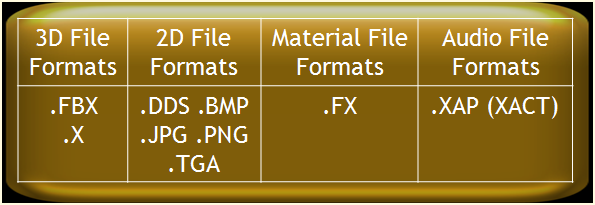
XNA Game Studio Express provides a number of standard importers, listed in Standard Importers and Processors, including an importer for the the Autodesk .fbx format, and one for the
DirectX .x format. This can simplify importing, since many DCC tools can export content to one of these formats as well as to their own native formats. In many cases, Content Pipeline importers convert any content they can into managed objects based on the Content Document Object Model (DOM), which includes strong typing for assets such as meshes, vertices, and materials.
The following figure shows the default importers.
(Image from the XNA Team blog)
Processors
A content processor accepts as input the output generated by an importer. In many cases, as discussed above, this output consists of standard Content DOM objects, but may also consist of custom objects. A content processor then produces managed objects that can be used in a game. In the case of standard Content DOM objects, this transformation can be performed by classes in the Content Pipeline class library.
Content Compiler
After the various game assets are added to the project and the managed code is generated by the content processors, the managed code is serialized into a compact binary format by the Content Pipeline content compiler. This format is tightly coupled to the XNA Framework and is not designed for use by other run-time libraries.
Loader
When the compiled asset is needed in a game, calling the
ContentManager.Load method invokes the loader, which locates and loads the asset into the game so that it can be used.


 png
png  gif
gif 



